Updates
 TIXX-ONLINESHOP - Optimised selection of promotion discounts
01.06.2026
This update makes the purchase process even more convenient for customers using a promotion code.
After successfully entering a promotion code, the corresponding discount unlocked by the code will now be automatically preselected in the price selection when using a seat map in the online shop. Customers no longer need to manually choose the correct discount and can access their desired offer more quickly.
When best seat search by price category is used for sales, promotion discounts are now highlighted more prominently, making them instantly recognisable.
In summary:
- After redeeming a promotion code, the unlocked discount is automatically preselected.
- If multiple promotion discounts are available, the discount with the highest ticket price is selected by default.
- In Best Seat Search by Price Category, promotion discounts are marked with a visually highlighted indicator.
- The displayed indicator text can be customised individually.
Customisation options
In best seat search by price category, promotion discounts are highlighted with a coloured badge. By default, the badge colours are based on the values defined in the style file(s) (background: <code data-start="1251" data-end="1267">$color__accent</code>, text: <code data-start="1275" data-end="1300">$color__accent-contrast</code>)
- The badge text can be customised individually via the language file for each OLS (language key: bestseatbyprice.promotionbadge).
TIXX-ONLINESHOP - Display customer number in personal details
01.06.2026
From now on, the customer number can be displayed directly on the “personal data” page. It is now shown by default as the first field within the personal data section. This allows fans to quickly access their customer number at any time, for example when contacting customer service or using additional services.
If an external Single Sign-On (SSO) solution is being used, the authorisation field will be hidden.
If you do not want the customer number to be displayed in the “My Account” area of the online shop, this can be disabled in the Online Shop Admin. Simply edit the “show customer number” checkbox and remove the tick.
TIXX-ONLINESHOP - Display membership number directly in group overview
01.06.2026
A fan's membership number and other numbers of identifcation can now be displayed in the group overview of the online shop.
The membership number is optionally displayed in brackets after the name of the respective group. The label for the number can be defined individually for each customer pool, for example as “Membership Number”, “Season Ticket Number”, or any club-specific designation.
The display of membership numbers can be enabled or disabled separately for each customer pool within the Shop Admin.
In summary:
- Displaying membership numbers is disabled by default.
- Activation is configured per customer pool in the Shop Admin. A new option called “Display Number” is available in the customer pool settings for this purpose.
- The field label can be customised for each customer pool in the Tixx Backoffice under “Number Label”.
- Once activated, the membership number (or other configured number) will be displayed in the online shop’s group overview, directly after the name of the respective customer pool.
 TIXX-BACKOFFICE - Hide fees of archived price lists in promotions
01.06.2026
Managing and creating promotions in the Tixx-Backoffice is now more streamlined and less prone to configuration errors.
From now on, only fees from active price lists are displayed in the discount selection. Fees from archived price lists are automatically hidden and can no longer be selected when creating or editing promotions.
Please note:
- The filter only applies when adding new discounts (i.e. the “not linked reducations” section on the left side of the discount selection).
- Fees that are already linked to a promotion remain visible, even if the underlying price list has since been archived.
- Previously linked discounts (i.e. the right side of the discount selection) can still be removed at any time, regardless of whether they originate from an active or archived price list.
TIXX-BACKOFFICE - IBAN Validation for Clubsale Offers
01.06.2026
From now on, entering bank account details when creating offers in Clubsale will be even more reliable. When creating new offers, only IBAN numbers from SEPA countries will be accepted.
The reason for this change is to prevent failed payouts caused by unsupported bank account details. IBAN numbers from non-SEPA countries, such as Turkey or Brazil, cannot be used for SEPA transfers and have occasionally resulted in rejected transactions in the past.
TIXX-BACKOFFICE - Contact Permission Service: Easily manage consents in a GDPR-compliant way
15.04.2026
With the new Contact Permission Service (CPS), you get a central tool to capture and manage consents for newsletters and other communication activities in a structured and legally compliant manner.
CPS integrates seamlessly into the EVENTIM.Tixx product ecosystem: consents are collected directly in the Tixx online shop, confirmed automatically via double opt-in, then documented in Tixx CRM and made available for use in Tixx Campaign.
Your benefits at a glance:
- Centralised and transparent management of consents
- GDPR-compliant processes including double opt-in
- Direct use of data for targeted campaigns
- Clear separation and control of communication preferences
- Reduced manual effort in daily operations
Optionally, consents can also be transferred to external systems—ensuring maximum flexibility within your system landscape.
You can find all details on usage, setup, and application in our manuals:
TIXX-BACKOFFICE - Customization of Wallet Layouts Nr. 2
15.04.2026
In addition to the existing options for colour and graphical customisation of wallet tickets, you can now also customise the headings displayed on your wallet tickets.
These changes always apply per delivery gateway. If you have linked multiple delivery methods to a single gateway, please ensure in advance that the text adjustments are suitable for all cases.
How to apply the changes:
Within your “mobile ticket” or “digital ticket” delivery gateway, you will find a drop-down menu that allows you to customise the headings “Section”, “Block”, “Row”, and “Seat” using predefined entries to better fit your use case.
The predefined entries differ between the Sports and Festival templates.
The following options are available:
| Label | Options |
| Area | Tribune, Area, Section, Entrance, Access, Venue |
| Seat Category | Block, Section, Sector, Entrance |
| Place Detail | Row, Area, Table |
| Place | Seat, Place |
If you would like to apply your changes to tickets that have already been sold, please perform a wallet update in your games or events so that the wallet tickets are refreshed.
TIXX-ONLINESHOP - Sorting of events and vouchers
17.03.2026
You can now freely sort your games, events, and vouchers in the online shop admin.
To do this, go to the “Shops” section in the online shop admin, open your shop tab, enable the option “Sort events by priority,” and then use the “Priority” column in the event overview (see screenshot) to define the ranking.
Even if you offer events with the same date and time, your prioritisation will ultimately determine the order in which they are displayed.
TIXX-BACKOFFICE - Customization of Wallet Layouts
07.10.2025
You have various options for designing your Wallet Ticket. In the dispatch gateway of each affiliate, you can specify whether to use the background and thumbnail image or the strip image with a background color. Since the combination of strip image and background color is the most commonly used option, we have expanded the customization options.
Until now, you could define the wallet’s background and text color in the dispatch gateway and add the strip image to the game/event.
To give you more flexibility, you can now configure both the colors and the strip image also at the price and discount level. Important to note: you don’t need to change anything, existing settings remain unchanged.
Example 1: VIP Prices
If you want to use a different strip image for your VIP tickets (created as a separate price) than for all other tickets of the game, you can assign the alternative image to the “VIP” price. From now on, when this price and its discounts are booked, the new image will appear on the wallet. All other prices remain unaffected
Example 2: Child Discount
If you want child discounts to stand out at first glance, you can, for example, define a different background color for this discount. When a child discount is booked, this background color will be used, while all other discounts continue to use the background color from the dispatch gateway.
The new settings apply to all newly booked tickets and to tickets that are re-downloaded after adding the color or strip image.
TIXX-BACKOFFICE - Extension of Import “Short Format Tickets (Legion)”
30.07.2025
The import format “Short Format Tickets (Legion)” has been extended to include the shipping method. For example, if you want to import digital tickets directly in the future, you can now use this import format and no longer need to go through the standard import.
Another advantage is that you can import tickets for multiple games simultaneously, such as a home match ticket and a parking ticket. This way, all tickets receive the same invoice number, improving clarity.
The import format contains the shipping information in column L. You can simply enter the name of the shipping method and then assign it precisely during the import process.
Column overview for the import format:
SpielID;KdNr;;Block;Reihe;Sitz;Ermäßigung;;Zahlart;Barcode;;Versand
TIXX-ONLINESHOP - Notice Texts in the Upper Area of Reservations and “My Account”
24.07.2025
Would you like to better engage your fans at key points in the online shop? You can now do so at the top of the reservations page and the “My Account” page.
reviously, a text block could only be displayed below the page content – now you can also display a notice text in the upper area. This is ideal, for example, to provide additional information about reservation conversions.
You can select the notice text positions as usual via the Online Shop Admin. To do this, first create the content in the “Notice Texts” section. Then navigate via Shops → Select shop tab → Notice text assignment to the area where you want to place your newly created notice text.
For the new positions, it makes sense to add the notice texts for all active shop tabs.
TIXX-BACKOFFICE - Clearing Module
03.07.2025
In the “Booking” area, a tile for the new Clearing Module has been added. The same requirements and conditions for the use and display of data in the Clearing Module apply as in the Data/Documents section, including the correct assignment of document pools to the respective affiliates to ensure all data is visible.
A detailed description of the Clearing Module can be found here.
TIXX-ONLINESHOP - Accessibility for Tixx Online Shops
22.05.2025
As part of implementing the European Accessibility Act (EAA), based on the Web Content Accessibility Guidelines (WCAG), we continuously work to align our online shops with recognized digital accessibility standards.
Accessibility is not a one-time project but an ongoing process. Therefore, we regularly conduct technical and functional audits to identify potential barriers early. In addition, accessibility requirements are an integral part of our development process and are included in every new feature or product improvement.
We have compiled manuals to help you make your online shops (Ticketing and Merchandising) accessible.
TIXX-BACKOFFICE - Centralization of affiliate switch
08.05.2025
We have centralized affiliate switching and the related user permissions in one place within the Tixx Backoffice. This means that every affiliate switch is now performed via the already familiar “affiliate Switch” in the header of the Tixx Backoffice. Switching via the master data page or the “Company” tile is no longer possible.
“Company” tile: When clicking the “Company” tile, you will land on the master data page of the affiliate you are currently logged into.
Rights management for affiliates: There are two options to grant users access to additional affiliates.
- “Access to all sub-affiliates” → The user is authorized to log into all current and future affiliates of the client.
- Assigning individual affiliates via “can log in to” → The user is authorized to log into all assigned affiliates of the client.
Switching can be done either via the affiliate Switch or by directly logging into a sub-affiliate.
The Chameleon right, which previously allowed switching to all affiliates of the client, is replaced by the right “Access to all sub-affiliates.”.
TIXX-BACKOFFICE - Extension of Clubsale Report
02.04.2025
The Clubsale Report has been extended to include the date and time of the sales transaction, allowing for precise allocation of Clubsale transactions.
TIXX-BACKOFFICE - Limitations for Gift Vouchers
02.04.2025
To ensure gift vouchers do not appear in the booking mask of all affiliates, you can now set restrictions for them. As with all games and season tickets, the limitation for a gift voucher or the “Competition” Gift Vouchers must be set in the respective affiliate for them to appear in the booking mask and be available for booking.
TIXX-BACKOFFICE - QR Code on hard tickets
02.04.2025
The new season is just around the corner, and we are pleased to announce that we can now print a QR code on hard tickets.
The QR code is printed on the ticket at a size of 1.6 x 1.6 cm. With an additional white border, you should allow at least 2 x 2 cm for printing the QR code.
The variable is: QRBARCODE
If you also want to print the barcode number, you can use this variable: TICKETBARCODENUMBER
TIXX-BACKOFFICE - New Functions on the Start Page
26.03.2025
To view your most frequently used Tixx features at a glance, you can now save individual tiles as favorites. The selection can be customized per affiliate, and the tiles are displayed in the order you add them by clicking the star icon.
Prefer clicking to scrolling? Then this update is perfect for you: all areas in the Tixx Backoffice can now be expanded and collapsed. If you prefer the familiar view, you can of course keep all areas expanded.
TIXX-BACKOFFICE - New Version of PrintControl
17.03.2025
With the new version 5.9.0 of PrintControl, you receive an updated ini file in which the debug mode has been optimized to prevent print processes from slowing down.
You can download the new version of PrintControl here.
TIXX-BACKOFFICE - Shipping Method ID on the Shipping Methods Overview Page
20.01.2025
Since the shipping method ID is partly used for imports, we have now added this ID to the overview page of shipping methods. This saves you one click when you need to use the ID.
TIXX-ACCOUNTS - B2B Information on the First Registration Page
20.01.2025
The registration page via Tixx SSO has been adjusted so that there is no longer a switch between private and business customers. If the customer is a business customer, “Company” can now be selected instead of Mr / Ms / No specification.
When “Company” is selected, the free-text field for the company name becomes mandatory; otherwise, it remains optional.
TIXX-BACKOFFICE - Extension of Game Statistics
20.01.2025
We have extended the statistic “All Reserved Seats of a Game” to include the expiration date of the reservation.
With this statistic, you can see all reservations for the corresponding event at a glance and sort or filter them by expiration date.
TIXX-BACKOFFICE - Fee Dropdown “subtract/add” in Correct Row
17.01.2025
For each fee, you can decide whether it should be subtracted from or added to the base price.
We have moved this field so that the selection “Add value / Subtract value” now appears directly next to the absolute and relative value fields.
TIXX-BACKOFFICE - New Variable for Barcode ID
4.11.2024
The variable TICKETBARCODENUMBER can be used to display only the ID of the barcode.
Unlike the well-known barcode variable TICKETBARCODE2, this variant does not print the barcode itself. The new variable is designed for print@home tickets and is suitable for displaying codes that use the ticket barcode as an ID.
Example: The public transport services connected via Tixx-Connect (Ride and RKU-IT) use the barcode ID as an identifier to issue a free public transport ticket to the ticket holder.
TIXX-BACKOFFICE & TIXX-CRM - CUSTOMER POOLS AND ATTRIBUTES
16.10.2024
Customer pools (Tixx Backoffice) and attributes (Tixx CRM) are different terms but represent the same use case. Both group customers into a collective group. For example, members, employees, or season ticket holders can be combined into a customer group. Various rights can be assigned to these customer groups — from pre-sale rights and discounts to the ability to purchase more tickets than others.
You can find more details about managing customer pools and attributes and how they interact here.
 EVENTIM.ACCESS - WEBCLIENT REPLACES ADMINCLIENT
10.01.2024
The EVENTIM.Access Webclient has received its final update, meaning that all functionalities of the AdminClient are now also available in the Webclient.
In addition to the modern interface, the web-based application offers the major advantage of being usable on all devices — from PC to smartphone — without needing to download software. On the event day, you always have access to current entry figures and live scan lists, no matter where you are.
How do I log in to the Webclient for the first time?
If you have never logged into the Webclient before, you must enter your terminal number in addition to your user credentials during your first login (you can find this number in the old AdminClient under Settings).
Alternatively, you can log into the existing AdminClient, click on Administration, and select “Webclient.” The linked functions will take you directly to the new environment.
TIXX-BACKOFFICE - UPDATE OF WALLET TICKETS
20.11.2023
Using the “Wallet Ticket Update” function, existing Wallet Tickets can be updated with new information.
During an update, all data is transferred again and displayed with the latest information. To perform an update, open the function in the event below “Activate Game.”
TIXX-BACKOFFICE - FILTERS IN GAME OVERVIEW
18.09.2023
New filter options are now available for selecting games. You can filter by period, competition, and additional stadium details. This helps you find the desired game more quickly. The new filters are available under “Setup: Games, Seat Contingents, and Quantity Contingents” as well as “Statistics: Games.”
TIXX-ONLINESHOP - DIGITAL TICKETS IN THE B2B CONTEXT
11.08.2023
The digital ticket functionality has been available for a year. Just in time for the start of the new seasons, we have released version 1 of “Digital Tickets in the B2B Context” and created a new landing page for digital tickets.
On the new “My Digital Tickets” page in the My Account area of the Tixx Online Shop, fans can find all upcoming digital tickets grouped by event. As an enhancement to the previous display, fans can now download and share multiple tickets at once.
More information on activating the “My Digital Tickets” tile can be found here.
 TIXX-CONNECT - EXTENDED TRANSFER OF PERSONALIZATION DATA
19.06.2023
Until now, only the first and last name as well as the email address collected via the public transport null gateway were transferred through Tixx-Connect. To give you maximum flexibility in mapping a wide variety of sales options, we have expanded the Tixx-Connect interface to include all additional personalization fields. Now, all information collected through the personalization feature can be transferred via Tixx-Connect:
- first and last name
- date of birth
- email adress
- phone number
- adress data
- three customizable free-text fields
Detailed information on the Tixx-Connect interface extension can be found, as usual, in the Tixx-Connect documentation.
TIXX-ONLINESHOP - CUSTOMIZATION OF THE COOKIE BANNER TEXT
27.03.2023
In order to always comply with the legal requirements as best as possible, we have adapted the standard texts for the cookie banner according to the data processing in the USA. These are necessary if you use the Google Tag Manager and Google Analytics in the Tixx online store.
Please keep in mind that this is only a recommendation and check internally your defaults to adapt the texts if necessary.
TIXX-ONLINESHOP - RELOAD MORE ORDERS INTO MY ACCOUNT
27.03.2023
With many invoices (>100) it could happen so far that the page had very long loading times or invoices were no longer displayed. The "Load more" button can now be used to reload and display additional invoices.
TIXX-ONLINESHOP - PRINT COUNTER FOR "DIGITAL TICKET
27.03.2023
Previously, when downloading a Wallet ticket that was booked with the "Digital Ticket" shipping method, the print counter for the downloaded Google or Apple Wallet ticket was not incremented. Among other things, this resulted in these tickets not being included in statistics that only take printed tickets into account.
In the future, all digital tickets will be marked as printed as soon as they are issued, regardless of whether they were downloaded as a PDF, Apple or Google Wallet ticket.
The ObjectViewer is excluded from the innovation. There, tickets will only be displayed as printed once they have been downloaded or saved by the purchaser.
TIXX-ONLINESHOP - OPTIONAL SALUTATION IN THE ONLINE SHOP
27.03.2023
Legal requirements do not allow the query of gender. Accordingly, this information will be optional in the future. In addition, "No specification" can also be selected.
TIXX-ONLINESHOP - DESCRIPTION TEXTS FOR PRICES AND DISCOUNTS
27.03.2023
New description texts make it even easier to present benefits and services of individual prices and discounts textually and visually. The description texts can contain full HTML and images, so that a lot of design freedom is possible here.
The description texts can only be displayed in the best place search via price categories.
 TIXX-CRM - CUSTOMER LOCKS WITH LOCKING REASON
27.03.2023
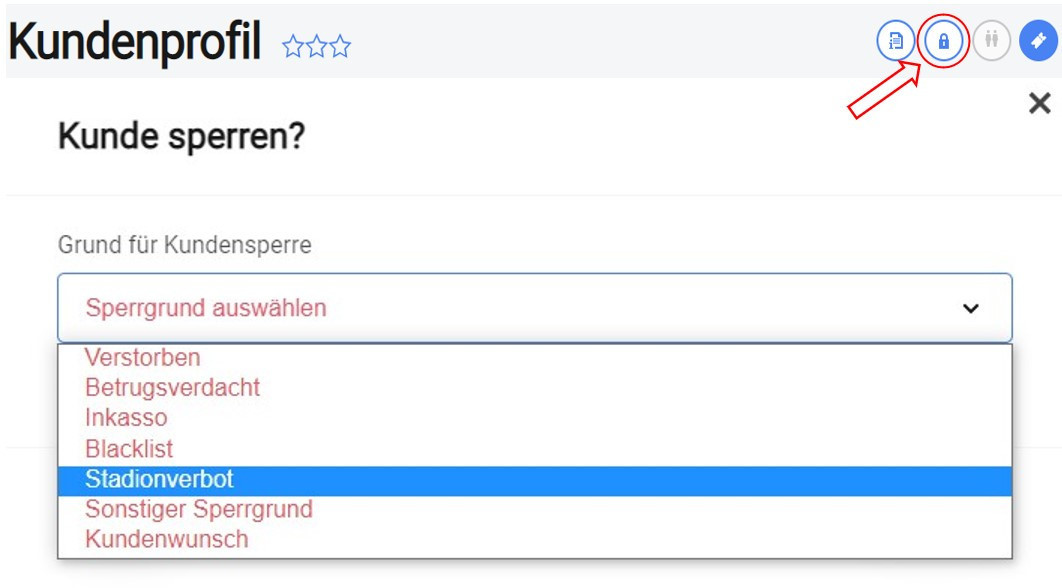
The Tixx CRM customer profile can now be used to block customer accounts across systems. A click on the corresponding icon also allows the selection of a predefined blocking reason.
The blocking is forwarded via Tixx-Connect to connected systems, including Tixx-Backoffice and Tixx-Merchandising. For customers who have already been blocked, the blocking reason can be displayed via a tooltip above the status.
TIXX-CRM - OPEN RESERVATIONS AT FIRST GLANCE
27.03.2023
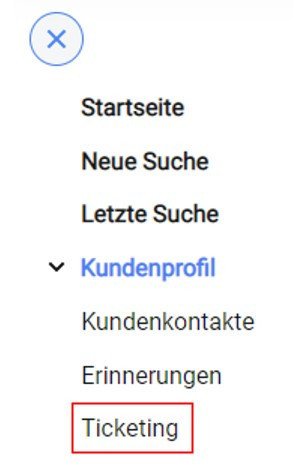
If the selected customer account has open reservations in Tixx, this is now already visible in the navigation bar on the left side.
Therefore, it is no longer necessary to scroll to get this information.
TIXX-CRM - OLS ACCESS AT CUSTOMER PLANT
27.03.2023
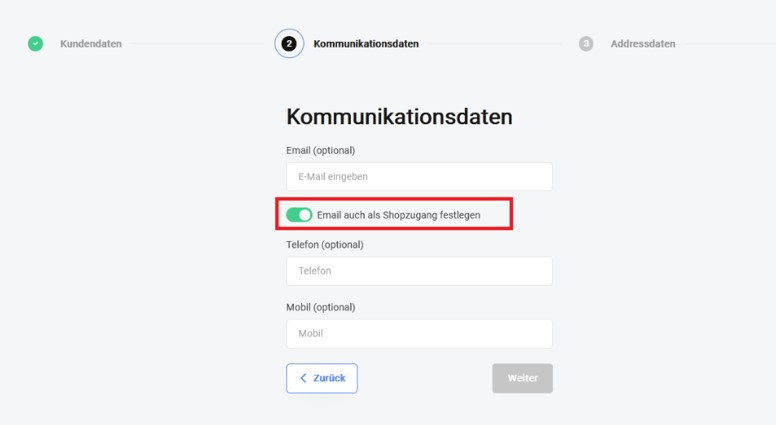
When creating new data records via the Tixx CRM interface, it is now possible to also set the email address as store access (Merchandising & Ticketing) right from the start.
The customer is then able to use the "forgotten password" function in the store to access his online account. The function is not available to event organizers with their own SSO provider.
 TIXX-MERCHANDISING - FRONTEND REDESIGN "FUTURECRAFT"
27.03.2023
We have given our merchandising online store a "new coat of paint" and developed a new, modern store design parallel to our old store design with the "Futurecraft" layout. This new design is already available and can be used at any time, once the configuration on your side is completed.
Since > 80% of our fans are now using mobile devices, we have implemented the optimization of the store according to the mobile first approach. In addition to new templates, user interface optimizations and new features were developed.
TIXX-MERCHANDISING - ROUNDING OFF PURCHASE VOUCHERS IN MERCHANDISING
27.03.2023
We have made some rounding off on the subject of purchase vouchers in merchandising, which affect both the interaction in the store and the settlements.
It is now no longer possible to pay for a purchase voucher with the payment method prepayment. Since this has occasionally led to difficulties in the past, we have implemented a logic that excludes this case.
Previously, the purchase voucher in a configured shopping cart price rule led to the total amount in the shopping cart being reduced by the purchase voucher and thus the shipping exemption could not take effect. We have adjusted this behavior, now the redemption of a voucher no longer reduces the total amount and the shopping cart price rule remains unaffected.
In addition to the store themes, we have also adjusted two billing themes regarding purchase vouchers. A purchase voucher has a VAT rate of 0%, this is now correctly taken into account in the settlement and shown as a payment method on the statement.
TIXX-MERCHANDISING - NO LOGIN OF A BANNED FAN POSSIBLE
27.03.2023
Previously, when a fan was blocked in the Tixx back office, a blocking reason was transmitted to Magento and stored at the respective customer, so that this fan could not place an order in the Merchandising Shop.
However, the fan could log in to the Merchandising Shop. We have optimized the process so that a check of all fans is already performed at login and a blocked fan can no longer log in to the merchandising store.
TIXX-MERCHANDISING - TRANSACTION-SPECIFIC CONVERSION TRACKING
27.03.2023
In order to collect and evaluate transaction-specific data and thus control Google Shopping campaigns, for example, it is necessary to implement an event snippet in the store code. Depending on the values contained in the snippet, this snippet dynamically transfers these values to the Google Ads account that is used to control the campaigns. The event snippet we implemented now transfers the following values:
- Order number
- Order value
- Currency
The use of these values or the creation of a campaign takes place in the Google Merchant Center. If you are interested, please contact your consultant.
TIXX-MERCHANDISING - ANIMATION FEATURE
27.03.2023
For the Christmas season, we implemented an animation feature that makes it possible, for example, to have snowflakes floating through the shop!
TIXX-BACKOFFICE - ADDITIONAL STORAGE OPTION - GOOGLE WALLET
20.10.2022
In addition to the existing storage options for digital tickets — PDF download and saving to the Apple Wallet — there is now an additional button that saves the ticket to the Google Wallet. A new button has been added to the “Share” page for this purpose.