TIXX-BACKOFFICE - CLEARING
In the “Booking” area, the tile for the new Clearing module is being introduced. For the use and display of data in the Clearing module, the same prerequisites and conditions apply as in the Data/Documents area; among other things, the correct assignment of document pools to the respective branches is necessary in order to view all data.
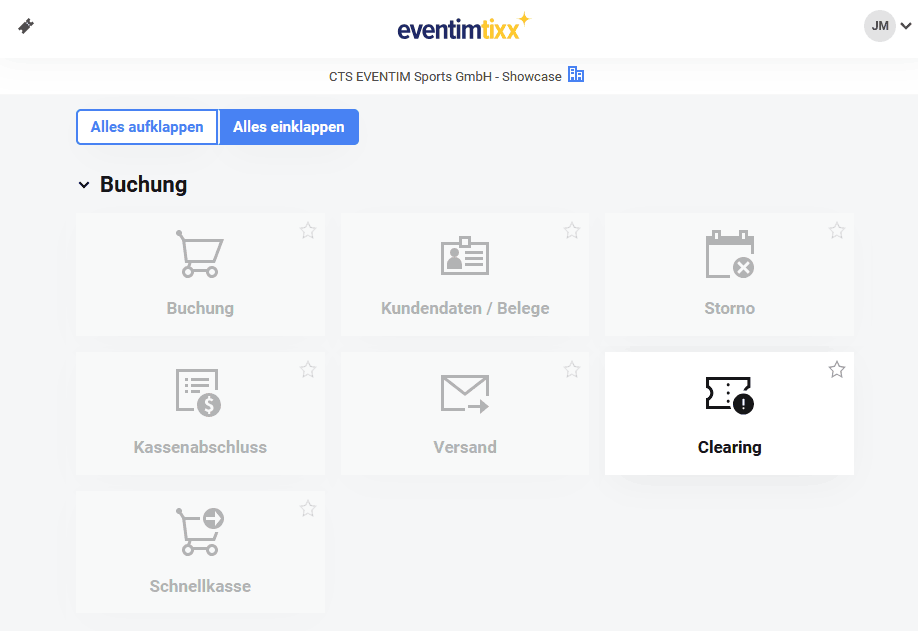
Three search variants to choose from
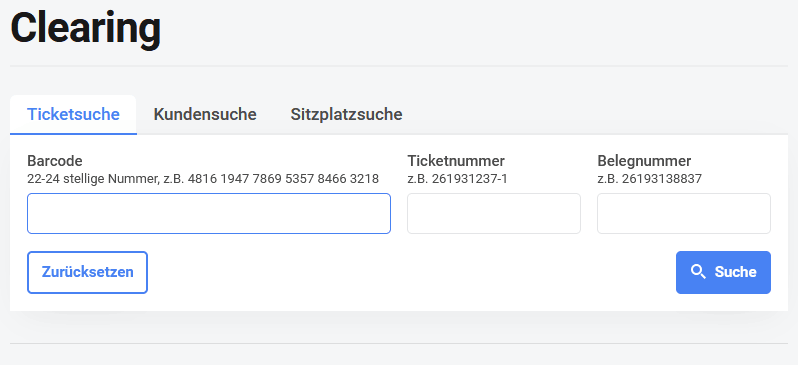
You can search for ticket, customer, and seat information. In the ticket search, it is sufficient to fill in one of the three fields. In the customer search, several fields can be filled in to reduce the number of search results (e.g., “First name: Maxine / Last name: Muster”). Common to all three searches: the results are displayed below the form and may therefore lie outside the visible area on small screens. If necessary, simply scroll down a bit.
The detail pages
- From the moment you select a search result, “Clearing” can be operated intuitively. On the respective detail pages, the relevant associated data records are linked.
- This way, you can move from a customer to all invoices of that customer and from the invoices to the corresponding tickets.
- Tickets contain the relevant information in the upper area (price, seat, barcode, and status), as well as the ticket history – from booking to entry.
- Season tickets (all ABO tickets) additionally contain a list of all sub-tickets of the respective event, allowing convenient back-and-forth navigation.
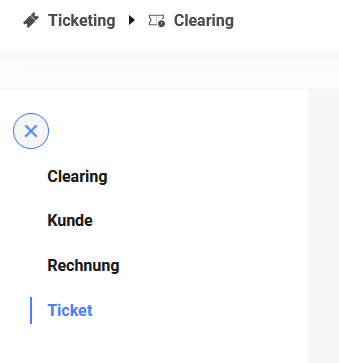
- The sidebar (shown next to it) reflects the hierarchy between customer – invoice – ticket and enables quick switching from a ticket to the associated invoice and from there to the associated customer.
- Clicking on “Clearing” opens the search page again.
Back / Forward / New Tab
The module behaves as expected from modern browser applications. You can navigate through the history using the browser’s “Back” and “Forward” functions. Likewise, it is possible to open pages in new tabs – in this case, a new login is required first, after which the requested page opens. Additionally, the URL of a subpage can be copied (and shared). In this way, a detail view, for example of a ticket, can easily be forwarded or bookmarked.