TIXX-CRM - CUSTOMER MERGE
It is now possible to merge individual customer records with each other via the Tixx CRM interface. The triggered merge is passed on to connected systems via Tixx-Connect so that the consolidation can also take place there. Currently, the function is available on the interface for the user role “Club Admin”. Shortly, the customer merge feature will also be rolled out for the user role “Ticket Agent” and will thus be available to all users at the organizer.
How is the merge triggered?
Currently, the function is available on the interface for the user role “Club Admin”. Potential duplicates are already indicated in the search results. These can then be cleaned up sequentially in the customer profile (in the case of more than one duplicate).

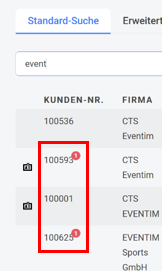
In the three-step process, the potential duplicates are first compared and it is determined whether they are actually duplicates. If they are not duplicates, this can be specified via “These are not duplicates”, and the two records will then no longer be displayed as potential duplicates. If they are duplicates, the data can be individually compiled in step 2. Unique and identical data fields are in most cases preselected in order to reduce the required clicks accordingly.
If one of the two records is to be adopted in full, the corresponding buttons can be used.
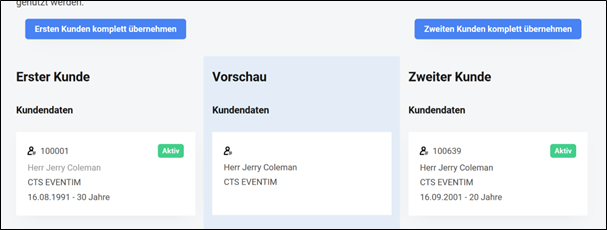
The “Next” button on this page is only activated once all required data has been selected.
If data is available in a field for at least one of the two customers, this field becomes mandatory and must be filled in the preview column. After a final review in step three, the records can then be merged. As an alternative to the process described above, and especially if duplicates were not automatically detected, individual records can also be manually transferred into the merge process via the tile on the start page.
What happens during the merge in CleverReach?
The data in CleverReach is adjusted according to the merge so that duplicates are also consolidated there.
What happens during the merge in Tixx merchandising?
The merge is forwarded to Magento via Tixx-Connect and is carried out there accordingly. Completed purchases are reassigned accordingly.
What happens during the merge in campai?
Changes resulting from the customer merge are also reflected in campai, or the corresponding data is adjusted on the member so that synchronization continues to take place with the correct customer from Tixx.
What happens in third-party systems?
If third-party systems are connected to Tixx via Tixx-Connect or other interfaces, the customer merge functionality must be checked individually. The merge process is part of Tixx-Connect and can therefore also be implemented in third-party systems. If in doubt, this should be discussed with the respective service providers and the consulting team.
Rollout for the Ticket Agent user role
Shortly, the customer merge feature will also be rolled out for the user role “Ticket Agent” and will thus be available to all users at the organizer.