TIXX ONLINE SHOP – REDEMPTION OF VOUCHERS IN THE TIXX ONLINE SHOP
Setup of the payment method in the Tixx back office
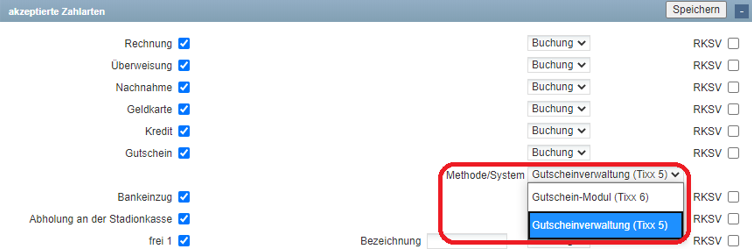
In order to redeem vouchers in the Tixx online shop, “Voucher” must be activated as a payment method in Tixx, in the branch, and for the user. To activate the voucher module, the “Voucher Module (Tixx 6)” must be selected as the system for the corresponding payment method. Please note that vouchers from the voucher management (Tixx 5) cannot be used in the voucher module (Tixx 6). For this purpose, any still valid voucher codes from the voucher management (Tixx 5) may need to be imported again.
Redemption in the Tixx online shop
Vouchers are redeemed on the “Review Order page” in the checkout of the Tixx online shop. The user already finds a reference to the possibility of redemption on the “Shipping & Payment Method page”. Multiple voucher codes can be entered one after another in the designated voucher field, which reduce the shopping cart value accordingly by the voucher value. Voucher codes that are not needed can be removed individually. If vouchers have not been fully redeemed because the voucher value is higher than the shopping cart value, the remaining value of the voucher is displayed. The same voucher code can be used for the next ticket purchase.
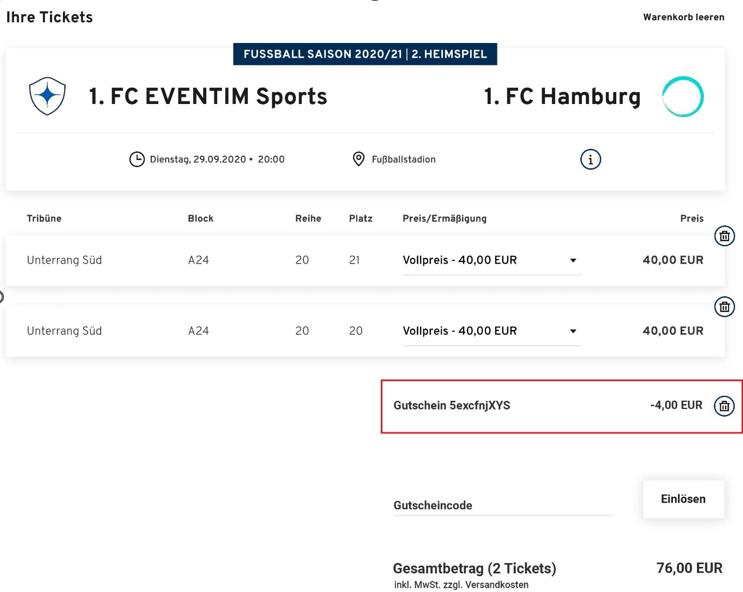
Vouchers can be used both for the booking of single and season tickets as well as for the conversion of reservations/options.